Diagrams inside your Jira issues —
not hidden in a panel.

The only Jira plugin that renders PlantUML & Mermaid directly in the issue description. Visible to everyone who opens the ticket.

Coming to Atlassian Marketplace
PROJ-142 Authentication flow redesign

As a user, I want to log in via SSO so that I don't need a separate password for every internal tool.

Acceptance criteria:

  • Browser redirects to the corporate SSO provider
  • After successful authentication, user lands on the dashboard
  • Session token is stored securely (httpOnly cookie)
  • Failed SSO attempts show a meaningful error message

Proposed flow:

Notes: The SSO provider returns a JWT token. Auth Service validates the signature against the provider's public key before creating a session. Token expiry is set to 8 hours to match the corporate policy. See the class diagram in PROJ-138 for the session model.

Updated by @anna.kowalski · 2 hours ago

This diagram is inside the description, not a panel
Client-side rendering No external servers 16 diagram types Free to install

Your data, your rules

Can you approve this plugin for your 500-person org? Yes. Here's why.

No servers, ever (by default)

Built-in TypeScript rendering engine runs in the browser. Your diagram source is never transmitted to any external service. No Java server to deploy, configure, or patch.

No third-party accounts

Install from the Atlassian Marketplace and start diagramming. No signup for an external service, no OAuth to a third-party, no data shared outside Atlassian.

Opt-in server rendering

Teams that need full PlantUML/Mermaid spec coverage can opt in to server rendering. HTTPS-only, configurable endpoints, private IP ranges blocked. The choice is yours — not ours.

Diagram source stays in Jira

Diagrams are stored in Jira app storage, scoped to your instance. No external databases, no cloud sync, no telemetry on diagram content.

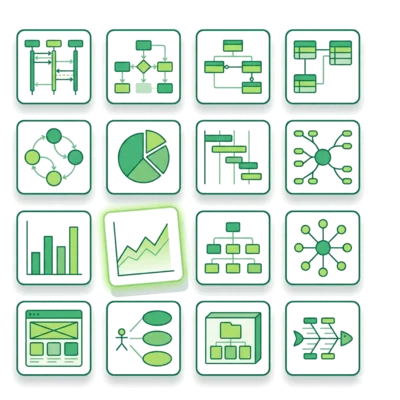
PlantUML + Mermaid. 16 types. One editor.

Write in whichever syntax you prefer — SeedUML auto-detects and renders.

PlantUML

Mermaid

Everything your team needs

Install once, use everywhere. No training, no configuration, no maintenance.

🕒

Version history

Every diagram saves up to 10 versions. Restore any previous version with one click. Full audit trail of changes.
📄

16 built-in templates

Start from templates for all 16 diagram types. New team members are productive on day one.
📥

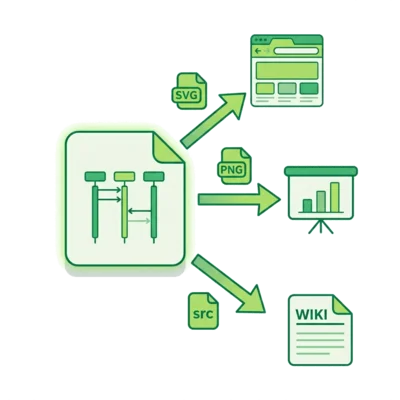
Export anywhere

Download as SVG, PNG (2x resolution), or source file (.puml / .mmd). Use diagrams in docs, presentations, wikis.

Configurable rendering

Default: zero-trust local rendering. Teams that need broader syntax coverage can opt in to server rendering per engine.

Simple, transparent pricing

All features included in every plan. You only pay for team size.

Free
$0
Up to 10 users
16 diagram types, unlimited diagrams, client-side rendering, version history, PNG export & inline insertion. Community support.
Free — Coming Soon
Recommended
Team
$9/mo
Up to 50 users
Everything in Free, plus email support for your team.
Team — Coming Soon
Business
$49/mo
Up to 500 users
Everything in Team, plus priority support with faster response times.
Business — Coming Soon
Enterprise
Custom
Unlimited users
Everything in Business, plus dedicated support, SLA, and custom onboarding for your organization.
Contact Us

30-day free trial on all paid plans. No credit card required.

All plans include all 16 diagram types, unlimited diagrams, client-side rendering, version history, and export. Billed through the Atlassian Marketplace.

Try it now — no Jira required

Free online editor. Same rendering engine. Export to disk.

Open Playground →